Typing up invoices, confirming appointments twice, copying data from one system to the next: in many businesses, this routine work takes several hours a week without ever showing up as a cost.
Automation takes exactly this work off your plate, so your team can focus on the core business instead of on the steps in between.
Our technology foundation: the n8n automation platform
For your automations, we rely on n8n, one of the most modern platforms for process automation. It connects directly to more than 400 applications, from Microsoft 365 and CRM systems to your accounting software.
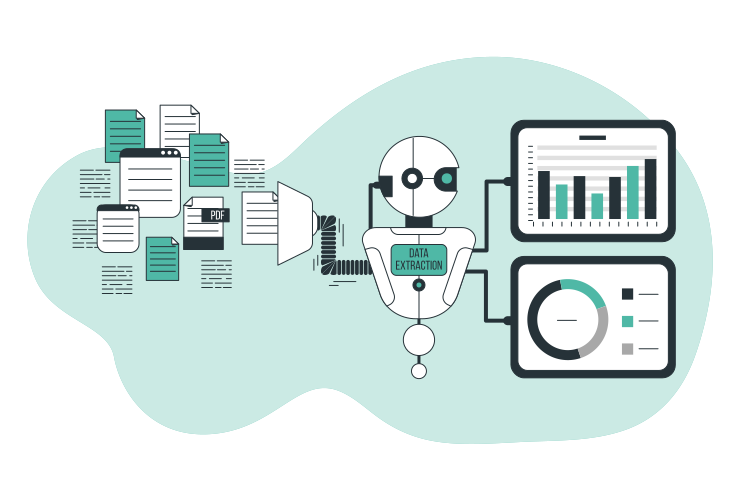
Where it makes sense, we add AI to the workflows: documents are read, requests are categorized and data is analyzed automatically, instead of someone sorting through it all by hand.
If you prefer, n8n can run on your own servers in Germany. Your data stays under your control, and you're not tied to a single vendor.
Manual data entry costs time and patience. We automate it.
Many businesses copy data from one system to the next by hand. That costs time every day and leads to mistakes. Automation turns this around: workflows run on their own, and your team takes care of what really matters.
Time spent
Without automation
Invoices, requests and data are copied over and reconciled by hand every day. That ties up hours that are missing elsewhere.
With
Routine work runs in the background. Automation takes over the recurring steps, and your team wins back time every week.
Error rate
Without automation
Manual data entry leads to transposed digits and copying errors that often aren't noticed until much later.
With
Data is captured once, then passed on automatically and consistently. That significantly lowers the error rate.
Disconnected systems
Without automation
Inventory management, CRM, email and spreadsheets sit side by side, and every switch between them means manual work.
With
Your systems talk to each other. Integrations connect your tools so that information arrives where it's needed.
Growth
Without automation
More orders mean more admin. At some point, the team can no longer keep up with the routine work.
With
Workflows grow with you. An automated process handles twice as many cases without any extra effort.
The best task is the one nobody has to do anymore, because it's been running automatically for ages. Less manual work, fewer mistakes, more time for your core business.
Certified partners & technologies
Microsoft
Microsoft
Microsoft
Microsoft
Microsoft
Microsoft
Real-world examples
Typical use cases
Six typical workflows we take off businesses' hands. Tap or hover for details.
Data consolidation
View details
Data consolidation
Data from several systems, such as inventory management, CRM, accounting and spreadsheets, flows automatically into one dashboard. Key figures are calculated and presented clearly, so you can see where your business stands at any time, without compiling numbers by hand.
System to system
View details
System to system
Two systems are connected automatically. When a record changes on one side, the other updates itself, with no manual step, export or copying from spreadsheets in between.
Form → system
View details
Form → system
Form data from your website or internal forms flows straight into the target system, such as your CRM or ticket system. Nothing gets retyped, and requests are ready for your team to work on immediately.
Invoices & filing
View details
Invoices & filing
Invoices are captured automatically, matched to the right case and filed properly. A pre-check flags anything unusual, so your accounting team only has to deal with the exceptions.
On-/offboarding
View details
On-/offboarding
When people join or leave, access, accounts and permissions are created or blocked automatically. That saves IT time and ensures nobody has too many or too few permissions.
Rule-based escalation
View details
Rule-based escalation
Cases are automatically forwarded or escalated according to fixed rules, for example when a request has been open too long. That way, nothing falls through the cracks and the right person is informed in time.
Examples from practice
This is what automated workflows look like in everyday business.
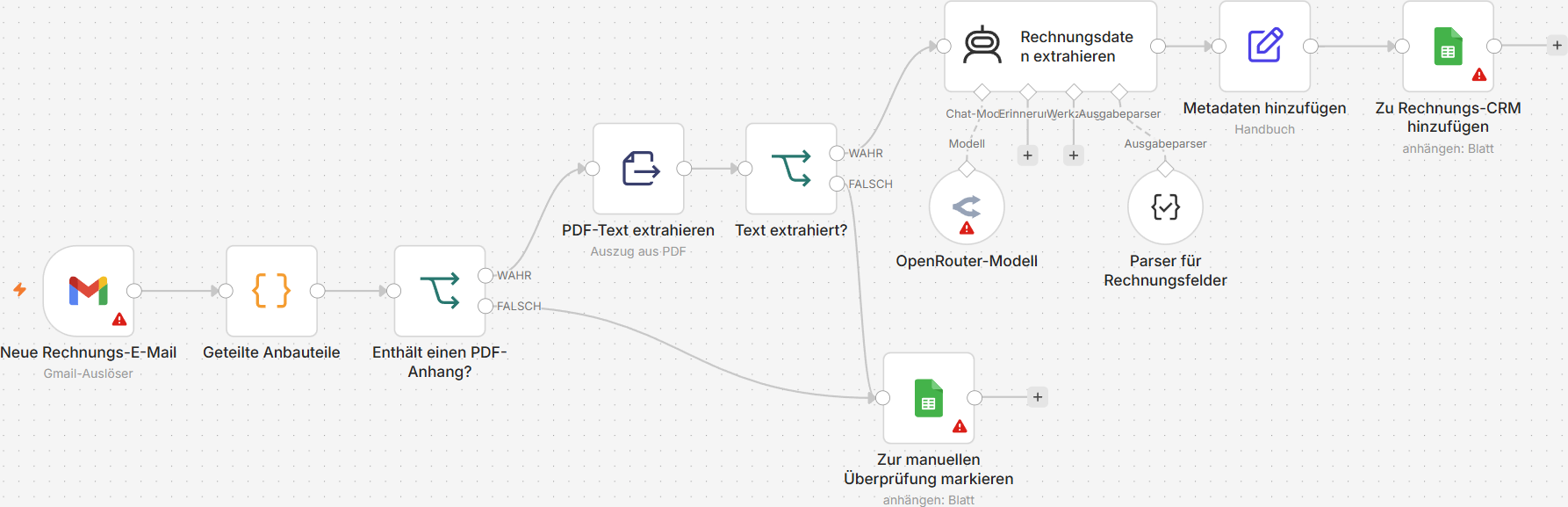
Invoice processing
Incoming invoice emails are filtered for PDF attachments. An AI extracts the invoice data automatically and enters it straight into the invoicing CRM. If that fails, the invoice is flagged for manual review.
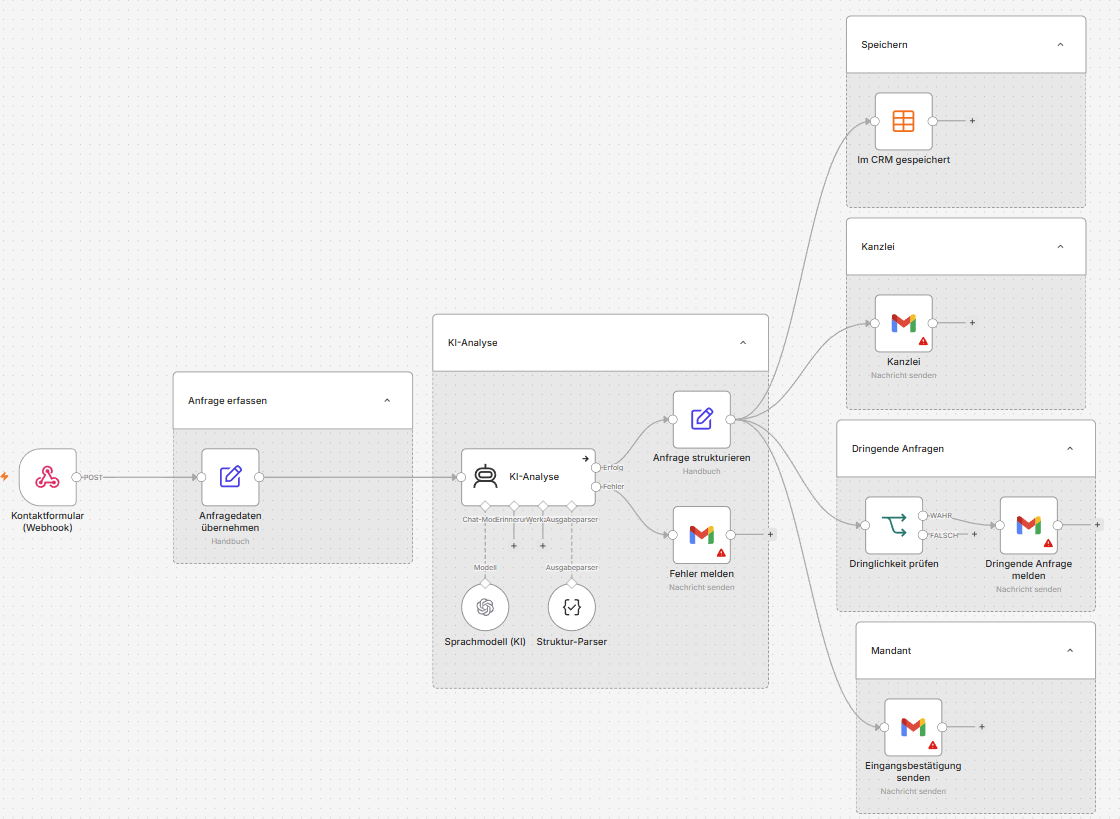
Enquiries from a website contact form are analyzed and structured by an AI. The system saves the data in the CRM, sends the client a confirmation and notifies the law firm, even with a separate express alert when it's urgent.
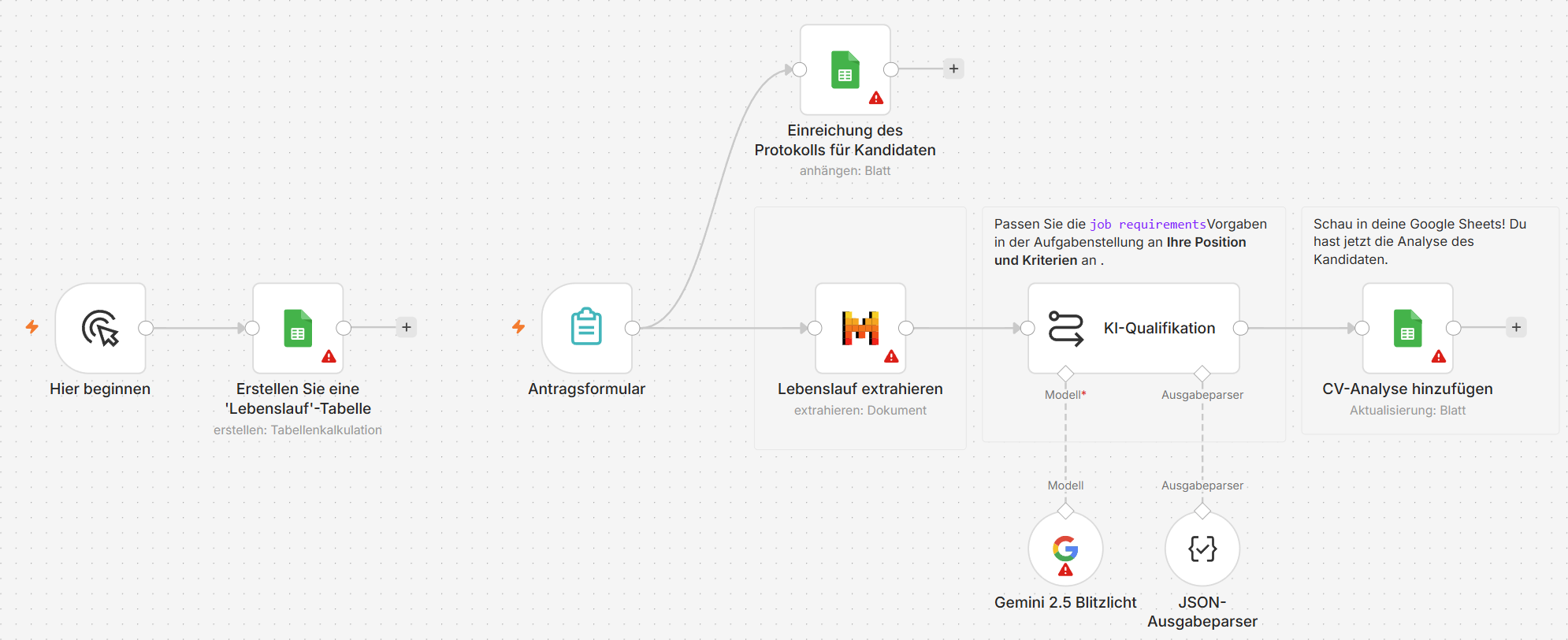
Once an application form is submitted, the résumé is extracted automatically. The Gemini 2.5 Flash AI compares the qualifications with the job requirements and saves the analysis in a Google Sheets spreadsheet.
Analysis: We map the existing workflow and identify what can be automated.
Quote: A fixed price instead of an hourly rate, calculated transparently.
Implementation: Testing with real cases, then handover. The automation belongs to you.
Support: Optional: we monitor the automation whenever your systems change.
Frequently asked questions about automation
What you should know before working with us.
The price depends on the scope and complexity of the process. After a quick look at your workflow, we'll give you a concrete quote.
Recurring, rule-based workflows are the best fit, such as invoice processing, syncing data between systems, reports or notifications. In the initial conversation, we look together at which of your processes will save the most effort.
No. We build the automation and hand over a solution that's up and running: your team uses it as usual, without having to program anything.
For a clearly defined process, usually a few days to two weeks. More extensive automations involving several systems take longer accordingly; we agree on the timeframe with you in advance.
We adapt the automation accordingly. Workflows change over time, so we document every solution in a way that makes later changes straightforward.
Usually the latter. The automation connects to your existing systems and links them together instead of replacing them: your team keeps working in the software it knows.
Get expert advice
Tell us what you need in just a few steps. We'll get back to you with a concrete assessment.
Insights
Answers to the questions we're asked most often in our day-to-day work: explained clearly and without unnecessary jargon.
We would like to use Google Analytics to measure how our website is used, so we can improve it for you. This involves sending pseudonymous usage data (for example pages viewed and an identifier of your browser) to Google, including to the USA. This only happens with your consent, and you can withdraw it at any time. Without your consent, nothing from Google is loaded.
Your choices
Decide which data you want to share with us. You can change your choices at any time using the cookie icon at the bottom left.